Continuous Integration
Running Scripts from Jenkins
Run a test script using the “eyeautomate_xunit.jar” plugin for Jenkins that is provided with the EyeServer installation.
The plugin will send an HTTP request to the EyeServer with the script to run. The result of the execution is stored in an xml file (named Xresult.xml) and can be retrieved by Jenkins. This requires that you are running the EyeServer on some machine within the network. The “eyeautomate_xunit.jar” plugin takes two parameters. The first is the address and port to the EyeServer and the second is the script to run.
Example of a configuration in Jenkins running on Windows:
Build / Execute Windows batch command / Command:
del *.xml

java -jar C:\EyeServer\eyeautomate_xunit.jar localhost:1234 scripts/images.txt
Post-build Actions / Publish JUnit test result report / Test report XML:s:
*result.xml
Continuous Integration Server Setup
Our recommended setup when using a CI Server with EyeServer is described below:
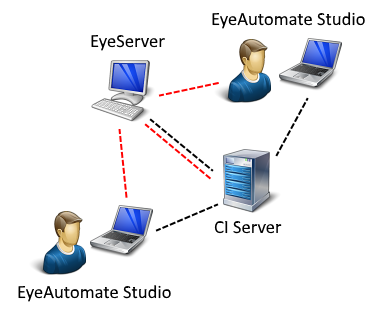
- A CI Server (like Jenkins) is installed on a server machine.
- A desktop machine (in the upper left corner) used for running the scripts either manually, from another client machine or triggered by the CI Server.
- A number of clients for developing scripts. The clients use the EyeServer for synchronization of script and data. Clients may also run scripts on the target desktop machine using a remote call.
Running From a Headless Machine
A headless machine does not have a user interface. Use a Virtual Frame Buffer to simulate a display in Linux. Use, for example, the commands below to start the EyeAutomate Web Service:
Xvfb :10
export DISPLAY=:10
java -jar EyeServer.jar